
All v2 requests are made to https://app.rhythm.cloud/api/v2. Before you start, your company and your user must be enabled for API Access; see the Rhythm API Overview.
The v2 API uses OAuth 2.1 with the authorization code flow. PKCE is required for every client, and only the S256 challenge method is accepted.
1. Create an OAuth Client
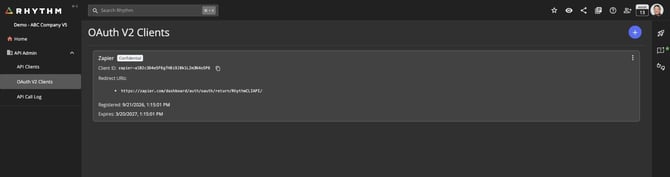
In Rhythm, open API Admin → OAuth V2 Clients and click the + button. In the New OAuth Client dialog, leave Preset as Custom (or pick a known integration to prefill the fields), give the client a name, and add the redirect URI your application will receive the authorization code on. The redirect URI must be an https:// URL.
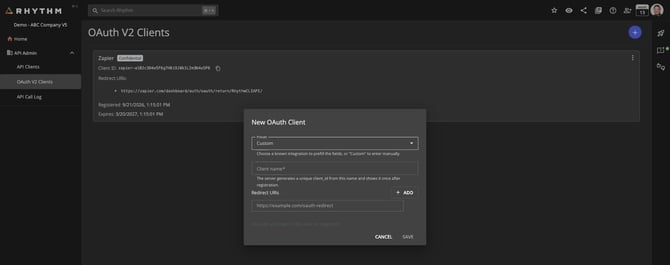
On save, Rhythm shows the Client ID and Client Secret. The secret is shown once. Store it securely.
Clients created here are confidential clients: the token request must include the client secret.
2. Send the user to the authorization page
Direct the Rhythm user to:
GET https://app.rhythm.cloud/api/v2/oauth/authorize
    ?response_type=code
    &client_id={CLIENT_ID}
    &redirect_uri={REDIRECT_URI}
    &code_challenge={CODE_CHALLENGE}
    &code_challenge_method=S256
    &state={STATE}
The user signs in to Rhythm (if not already signed in), reviews the access your integration is requesting, and approves. Rhythm redirects back to your redirect URI with code (and your state) in the query string.
3. Exchange the code for tokens
POST https://app.rhythm.cloud/api/v2/oauth/token
Content-Type: application/x-www-form-urlencoded

grant_type=authorization_code
&code={CODE}
&client_id={CLIENT_ID}
&client_secret={CLIENT_SECRET}
&redirect_uri={REDIRECT_URI}
&code_verifier={CODE_VERIFIER}
The redirect_uri must match the one registered on the client and used in the authorize request exactly.
Response:
{
  "access_token": "{JWT}",
  "token_type": "bearer",
  "expires_in": 3600,
  "refresh_token": "{REFRESH_TOKEN}"
}
| Token | Lifetime |
| Access token | 1 hour |
| Refresh token | 30 days |
4. Call the API
Send the access token as a bearer token on every request:
Authorization: Bearer {ACCESS_TOKEN}
5. Refresh the access token
When the access token expires, request a new one without sending the user back through authorization:
POST https://app.rhythm.cloud/api/v2/oauth/token
Content-Type: application/x-www-form-urlencoded

grant_type=refresh_token
&refresh_token={REFRESH_TOKEN}
&client_id={CLIENT_ID}
&client_secret={CLIENT_SECRET}
A new access token and refresh token are returned. Replace the stored refresh token with the new one.
An API Admin can remove an integration's access at any time by deleting its OAuth Client from API Admin → OAuth V2 Clients. Tokens issued to that client stop working immediately.
An OAuth Client also expires after 180 days with no token activity. Create a new client and have users authorize again if that happens.
Errors
Authentication failures return 401 with { "error": "unauthorized", "error_description": "…" }. Malformed token requests return 400 with invalid_request. Error conventions are described in the Rhythm API Overview.