

 All Articles
It may still feel like the middle of winter to some, but you might find that it is time to do some spring-cleaning when it comes to your KPIs. We recommend tracking no more than 8-12 KPIs at a time for each team, but we’ve noticed that some of our clients get trapped by what we call “KPI creep.” They may start with a list that makes sense for their business, and then over time, the KPIs just get rolled over from one quarter to the next and one year to the next, and they keep adding to the list as they develop new critical numbers or want to move the needle on different metrics. Before too long, their KPI dashboard is like that nightmare closet; you know, like your teenager’s closet, when you open the door and stuff falls out on your head because it is just so full and disorganized. If this is happening to you, you need to perform a KPI Audit to get back to measuring what matters.
I recently came across an article with tips for cleaning out your clothing and making decisions about what to keep, toss and donate, and it seems to me that many of the same tips could apply when conducting a KPI audit.
Step 1: Take everything out of the closet… Everything. When talking about your KPI dashboard, this means that you’re going to take a hard look at every KPI. This will help make sure that you start with a fresh list of only the KPIs you need. Nothing gets to stay in the closet without a hard look. Start your KPI audit with a clean slate, you have zero key performance indicators and are starting from scratch.
Step 2: Don’t put anything back in the closet until you ask yourself some questions:
- Does it still fit? If you remember the original purpose of tracking that KPI to begin with, does that still matter to you? Does measuring this metric in this way still make sense for your business?
- When’s the last time you actually “wore” it, or used it? If it is still applicable to your business, when is the last time you used this data to make a decision or take some action? What does measuring this KPI cause you to do differently when it is Red or Yellow?
- If you came across it now, would you buy it all over again? If you were starting from scratch with your KPI dashboard, would this metric make your short list? If so, why do you care so much about it?
- Is it damaged or in need of repair? If it is a KPI that used to work well for you, but doesn’t anymore, when’s the last time you updated the Red-Yellow-Green success criteria? Do you need to refine the way that you measure the KPI to make it work for you again?
- If you are stuck deciding whether you should keep, refine, or toss each KPI, use the Infographic below to help you consider each one.
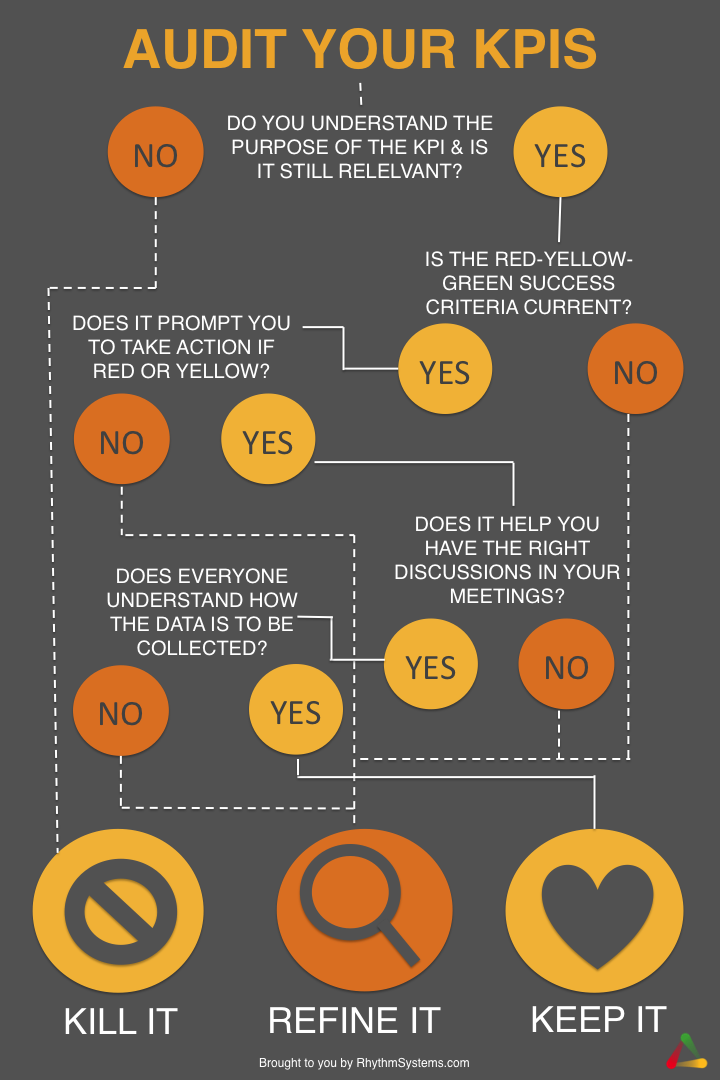
Step 3: When you have examined each item with the questions above and determined which ones still deserve a spot in your KPI audit closet, hang them back neatly. For your KPIs, this means keeping them organized so that you see what’s most critical to you first. This will help keep your weekly team meeting discussions focused and effective. You aren’t likely to take action on a KPI if it is buried in a list where you have to scroll and scroll to find it. Here are some KPI dashboard organizing tips if you are using Rhythm software:
- Decide whether each KPI should be displayed at the company level or in a departmental team. Think about who should own updating the status of this KPI and who should be discussing it each week in their adjustment meetings.
- Use Custom Dashboards to create views that are specific to you. If you want to view KPIs from multiple groups together in one place, this is the way to organize them. If you want to be laser focused on only a handful of KPIs to really move the needle on them, put them in a custom dashboard.
- While their main purpose is to calculate sums and averages for KPIs that roll up from individuals or departments, Composite KPIs also can be used to group related KPIs together, even if you don’t need them to do any math. This is another way to organize related KPIs in the system so you can keep your dashboards clean.
Step 4: Now that you’ve done the hard work of getting rid of what you don’t need anymore, take an inventory of what’s missing. Do you have any gaps in your new KPI wardrobe? You can use the considerations below to verify that you’re not overlooking an important aspect of your business with your new KPI set:
- Think about the six Rockefeller Habits categories for KPIs: Customers, Employees, Shareholders, Make/Buy/Deliver, Sales or Record Keeping (Finance). Are you overlooking one of these areas?
- Your KPI list should include a good mix of both leading and lagging indicators. Are you tracking both?
Step 5: Don’t let the clutter creep back in! Keep your KPI closet clean by conducting a mini-audit at every quarter turnover. Every time you start a new quarter, take these steps to help prevent KPI creep:
- Make sure you have a compelling reason to continue tracking each KPI on your dashboard rather than just rolling them all over without thinking.
- For each KPI you are keeping, ensure that you revisit the Red-Yellow-Green success criteria. You may need to reset your goals for the next 13 week race. This will help keep KPIs relevant for you over time.
- When you are adding any new KPIs (such as your critical numbers for the quarter), consider whether there are any you can remove. This will help you keep your list from continuing to grow unchecked.
- Keep a schedule for an internal audit of your KPIs at every annual planning meeting and tidy them up at every quarterly planning session.
Step 6: Finally, once you have your beautiful, newly organized set of KPIs, don’t forget to share them! Communicate clearly with your team about your KPI set. It is critical that everyone understands why you are measuring what you’ve decided to measure as well as how it is being measured. For any composite KPIs that go deeper into the organization, standardizing how the data is collected and reported is especially critical. You might need to determine a date/time each week for updates to be made, clarify where the numbers should come from and whether they reflect the current or past week’s data, set a standard for whether numbers can be rounded or abbreviated, etc. This will all ensure that the data you see when you open your KPI closet is accurate.
Just like cleaning out your clothing closet, cleaning out your KPI dashboards can be hard work. But, at the end of the day, sitting back and letting the zen of a well-organized and thought-through dashboard wash over you is well worth the effort. Don't forget to do your KPI Audit at each and every annual planning session when you update your annual plan. Remember that all performance measures are not equal. If your performance measures are outdated, it is time to perform a KPI audit and get your KPI dashboards back in order. I hope these audit KPI examples will help you get your team moving in the right direction!
Good luck!


Jessica Wishart
Jessica is Senior Product Manager at Rhythm Systems. She has experience in Client Services and Rhythm software technical support. Her background is in Organizational Execution.
 Connect with me on LinkedIn.