
Why Use Ask Patrick
Ask Patrick is like having our founder and CEO, Patrick Thean, in your pocket. He can answer your questions about Rhythm, your strategy, your goals, your meetings, and your stucks — and, with your approval, act directly on your plan. No more leaving Rhythm to ask Google, ping a coach, or type everything in by hand.
Ask Patrick can:
- Answer questions about your strategy, goals, KPIs, and methodology
- Read your live goals, KPIs, tasks, and notes to give you a grounded, specific answer instead of a generic one
- Diagnose why a goal is stuck and suggest a fix
- Draft and post real updates to your plan — status updates, Week in Sync notes, tasks, and more
- Run multi-step guided coaching workflows from start to finish
- Attach PDF, Word, Excel/CSV and image files to a chat to turn transcripts, whiteboard photos, strategy docs or spreadsheets into tasks, ideas, strategy or goals
You're always in control. Ask Patrick will show you exactly what it plans to write before it writes anything to your plan, and waits for your approval first. Nothing changes in Rhythm without you confirming it.
Getting Started
When you open a new Ask Patrick conversation, you'll see a few suggested prompts to help you get going right away — tap one, or type your own question in the box below. A few things you can ask:
- "What are examples of goals for [your job] to track?"
- "My KPI has been Red 3 weeks in a row. What should I do?"
- "This is my BHAG... how can I improve it?"
- "Draft my Week in Sync note."
- "What goals are in trouble, and what is the pattern?"
- "Is my team execution ready this quarter?"
- "Run a KPI health check for my team."
The sky is the limit! Ask Patrick will keep you on track if you get distracted chatting about non-work related questions, and you can ask as many questions as you want.
How Ask Patrick Works
Rhythm Intelligence powers Ask Patrick. We partnered with Anthropic to build this feature. Based on their underlying technology, we customized our chat experience and prompted our coach with our methodology, books, and blogs so it can respond based on our decades of experience and patterns.


Managing Your Conversation History
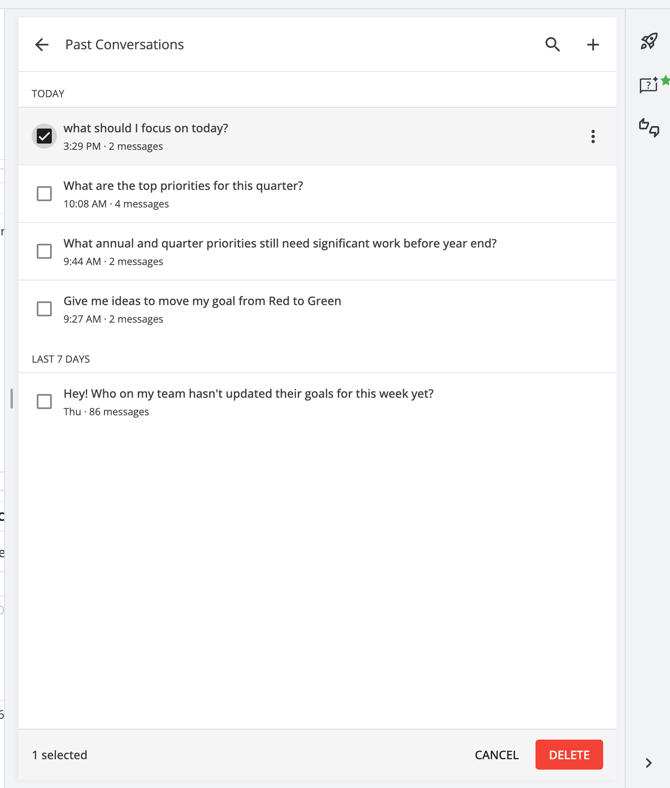
Ask Patrick keeps a history of your past conversations so you can pick up where you left off. Click the Past Conversations icon to:
- Search past conversations
- Pin important ones to the top for easy access
- Rename a conversation to something more memorable
- Delete conversations you no longer need
Pinned conversations appear at the top of your list, with everything else grouped by date.
If you'd like to delete your conversations, you can do that here by selecting them.
TIP: Want more room for the conversation? Unpin the tray so Ask Patrick opens over your page instead of squeezing it. See Navigating Rhythm.
Dictate a question
Instead of typing, you can speak your question to Ask Patrick. Your words appear in the message box, where you can edit them before you send. Nothing is sent until you click Send.
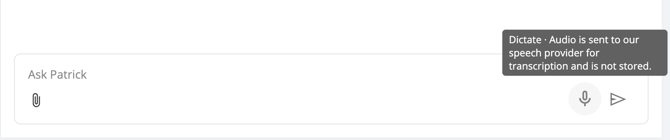
- Open Ask Patrick from the right-hand tray.
- Click the microphone beside Send. Allow microphone access if your browser asks.
- Speak. Your words appear in the message box as they are recognized.
- Click the microphone again to stop.
- Edit or clear the text if you like, then click Send.
While Rhythm is listening, the message box is read-only and Send is turned off.
When dictation stops on its own
- After 10 minutes in total (Dictation stopped after 10 minutes).
- After 5 minutes of silence.
- When the message reaches the 4,000-character limit. It cuts at a whole word and says Message limit reached.
If Rhythm does not hear anything, you see Didn't catch that. If transcription fails, you see Couldn't transcribe that, and any text already dictated is kept.
Good to know
- Your audio is sent to our speech provider for transcription and is not stored. The tooltip on the microphone says the same.
- If your browser blocks the microphone, Rhythm tells you and you can still type.
- If a Company Admin has turned off audio recording, the microphone does not appear.
- If a meeting recording is running in the same tab, dictation shares the microphone and ends when the recording lets it go.
Stuck Goal Prompts
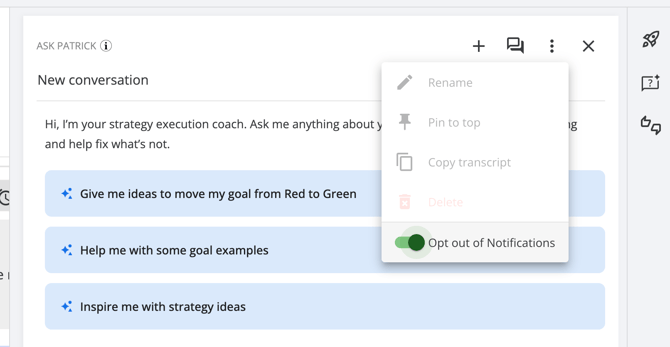
Ask Patrick proactively reaches out if you have a goal that is Red or hasn't been started by Week 6 of your 13-week race. Our data show these are the critical times to make an adjustment, and Ask Patrick is here to help you brainstorm a way to get unstuck!
If you'd prefer not to receive any notifications, you can always opt out by clicking the More Actions icon in the Ask Patrick window and toggling to Opt out of Notifications:
By using this feature, you acknowledge and agree to our Terms of Service. If your company does not want this feature, please email us to hide the chat panel.