

 All Articles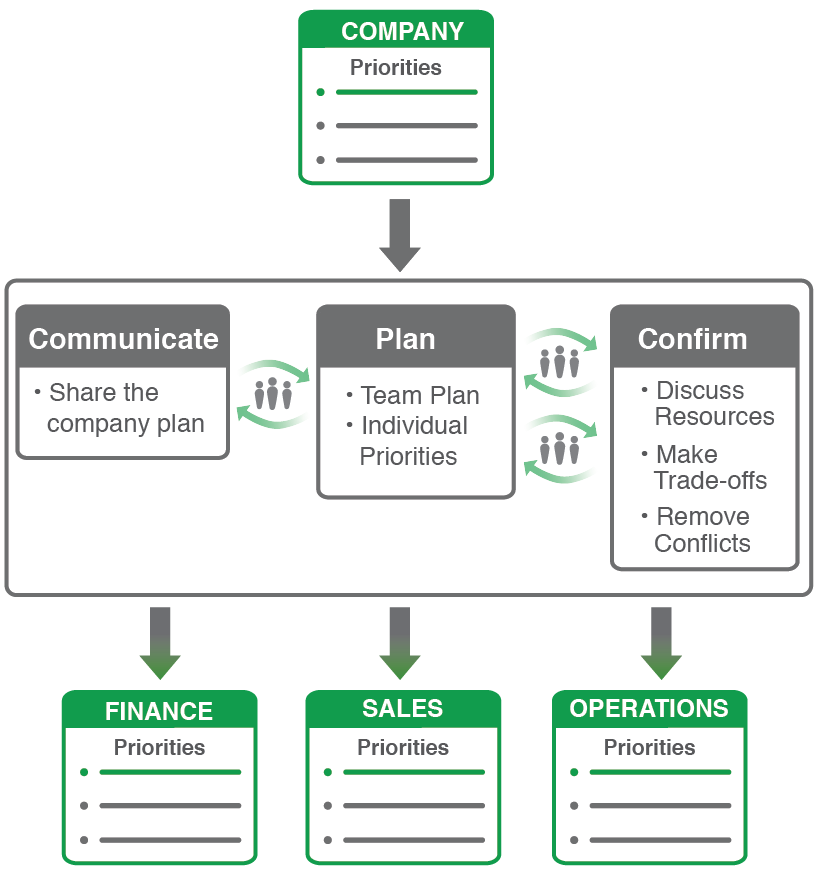
Implementing a new methodology for your team that requires people to be more focused, aligned and accountable doesn't always have everyone dancing in the aisles.
The best practice is for Rhythm implementation to begin with the executive team first. The executive team will build new habits around Think Plan Do®. They will learn how to have more effective Weekly Adjustment Meetings. They will become masters at Red-Yellow-Green.
Once the executive team is very comfortable with Rhythm, then it's time to cascade to departments. It's a big step, no doubt about it, and it's not uncommon for some to have trepidation about cascading Rhythm to their teams. Some teams actually get stuck here. However, it's nothing a little advanced planning can't help you overcome.
3 Things to Determine Before You Cascade Your Strategic Plan
1. Determine your Teams.
Cascading is less about hierarchy or who reports to whom. It is more about organizing people in the best way for effective planning sessions and weekly meetings. Who does it make sense to plan together quarterly and meet together weekly? Most times it runs along departmental lines (sales team, operations team, etc.), but that's not always the case. For example, it might make sense for Sales & Marketing to function together as a team in your organization (meaning they plan together quarterly and meeting together weekly). Or, it might make sense to separate them. You may decide to organize teams by location (stores, plants, etc.). Keep in mind that teams of 10 or less operate more efficiently.
2. Establish your Team Leaders.
Each team needs to have a Team Leader. Team Leaders usually sit on the executive team. They act as a guide during planning to drive the team's alignment to the Company Plan. They hold the team accountable to establishing their Plan and Do Rhythms. A strong Team Leader is paramount to the success of the team. Keep in mind that some Team Leaders might require some coaching to improve their skills.
3. Work out the Weekly Meeting Schedule.
One of the many benefits of cascade is the proper flow of information from the teams to the executive team. (Not to mention the ability of teams to look at each other!) The best sequence I have seen for Weekly Meetings is for teams to have their meetings prior to the executive team meeting. This enables Team Leaders to come to the Executive Team Weekly Meeting with the most up to date information from their teams. If something is stuck at the team level, it bubbles up through the Team Leader. Keep in mind that Planning works in the reverse - Company Planning first, then Cascade Planning.

Those of you using the Rhythm tool will also need to consider the following:
- Decide what's visible. There is the ability to enable access restrictions in the Rhythm software. You may choose for the Cascade Teams to be able to see the Executive Team dashboards, or, you may choose to not allow Teams to see the Executive Team dashboards. Another option is to set your Team up as a Restricted Team so only people specifically added have access to the information in that Team; this is good for Teams with sensitive information like HR. There is no right or wrong answer for this. It just depends on your comfort level. I personally prefer teams to strive for an open environment.
- Set teams up for successful onboarding. Work with your Rhythm Consultant to schedule a Team Leader Training session to kick things off. Your consultant can help each Team Leader prepare for their Team Planning Session. They can also review the Team Quarterly Plan with the Team Leader following the session to make sure data is entered properly. Consultants can also train each new Team of users to ensure they have a great experience.
So don't be afraid to take the leap into Rhythm Cascade. Change is scary - but not as scary as misalignment!

Tiffany Chepul
Tiffany is a Rhythm Consultant who helps leadership teams turn ambition into execution. With a strong foundation in sales and public relations, she brings both strategic clarity and real-world communication expertise to every engagement. Tiffany specializes in building high-performing Think Plan Do Rhythms that align teams, sharpen focus, and drive purposeful growth. She’s passionate about helping organizations move faster, stay accountable, and achieve meaningful, measurable results.
 Connect with me on LinkedIn.